Scheduling details
When changes to the schedule are made there are two schedules run concurrently, a timeline schedule and a full PO schedule.
The timeline schedule is triggered every time you make a change, and is used to update the Gantt chart and activity area grid with the new task sequence. It includes all production rates, dependencies and delays, including delays previously reported by the full schedule as the result of the reduce production rate to achieve blend feature. This allows planners to make multiple changes rapidly.
The full schedule runs to completion when changes are made, and each full schedule run incorporates the changes made during the previous full schedule calculation. When the full schedule completes, the results of the schedule are used to populate schedule reports, closing balance reports and for publishing the schedule results to EPF via data feed out. The full schedule runs on the XECUTE server and pushes results to connected clients.
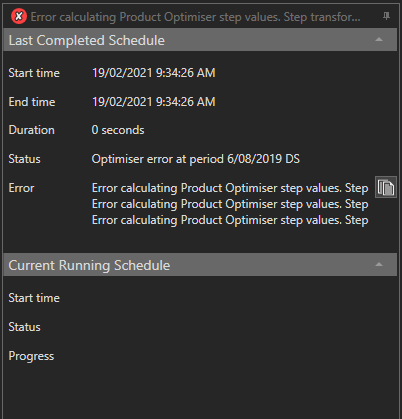
The schedule progress bar is located in the application status bar so that it is visible from all tabs. The progress displays as an animated progress icon to show the progress of the full schedule. Hover the mouse over the Status icon to get more information about the current running schedule and when the schedule was last run.
The schedule progress pane is dockable.
Any schedule errors are displayed and can be copied to the clipboard by clicking the clipboard icon to the right of the error message.
See the Events Tab for details on user actions that may trigger a schedule update.